The practical answer
Review the existing Xero record, list the missing evidence, search authorized email or supplier portals and verify the file. Attach it to the correct record rather than creating a duplicate purchase.
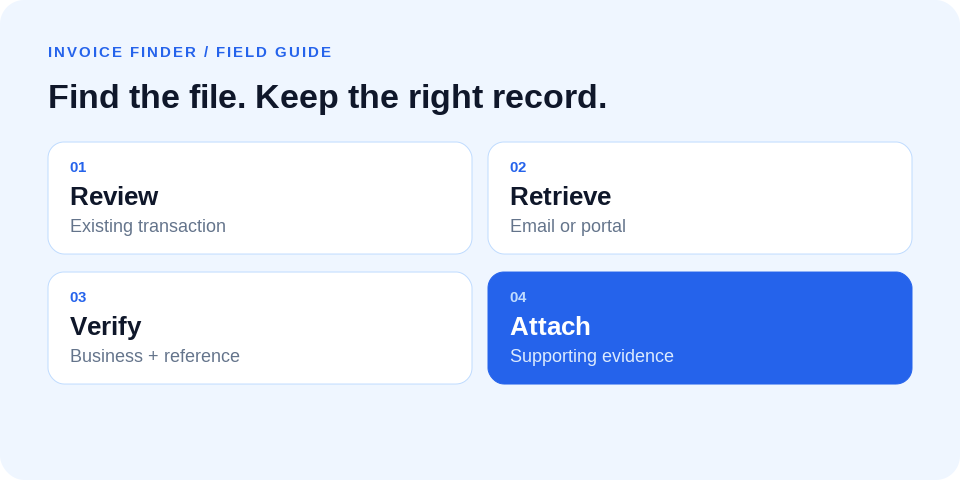
Identify the evidence gap in Xero
Start with the transaction or bill being reviewed. Check its details and existing attachments before searching elsewhere. The question is not simply whether a bank line is reconciled; it is whether the supporting record contains the document you need.
Do not assume there is one universal “all missing invoices” filter across every Xero organization and workflow. Use your review process to make a short exception list: business, supplier, transaction date, amount/currency, existing record reference and missing document.
- Distinguish a missing supplier invoice from a missing purchase receipt.
- Check whether a file exists but is incomplete, unreadable or attached to another record.
- Separate evidence gaps from unexplained payments or unreconciled bank lines.
- Confirm you have the appropriate access to view the relevant transaction and documents.
Search client email using the transaction as a clue
Use the supplier name, billing address and a likely period to find candidates. Begin with a broader date range than the bank payment date. Supplier invoice dates, service periods and bank settlement dates can differ.
from:billing@baysideoffice.example after:2026/10/01 before:2026/12/01Replace the fictional address and dates with the known purchase details. If a PDF search returns nothing, remove the attachment condition and check email-body receipts or billing links. The Gmail invoice guide gives a step-by-step starting point.
Only search accounts you are authorized to access. Coming soon: Invoice Finder collects your clients’ invoices and receipts from Gmail and Outlook as they arrive, and you can forward them in bulk to your Xero email-in address. See how it works.
Check supplier portals and existing document storage
If email only contains a billing notice, retrieve the file from the supplier’s known account portal. Check the agreed collection mailbox, document storage and the staff member who made the purchase before asking for the same document again.
For an unavailable invoice, ask the supplier to resend a copy of the original. Record which sources have already been checked so the next reviewer does not repeat the same search.
Match the document to the correct existing Xero record
Before attaching anything, compare the business recipient, supplier, invoice reference, issue date, period, amount and currency. Do not match on supplier and amount alone when a subscription repeats every month.
| Possible mismatch | Review before attaching |
|---|---|
| Payment and invoice dates differ | Which purchase or service period the invoice covers |
| Bank total differs from invoice | Currency conversion, fees, credits or part payments |
| One payment covers several bills | The supplier statement or remittance |
| A similar file is already attached | Whether it is the same document or a different period |
A retrieved file does not require a new bill if the purchase already exists. Keep document attachment, transaction creation and bank reconciliation as distinct decisions. If the record itself needs correction, send it through the normal accounting review.
Attach the supporting document in Xero
Xero supports attaching files to existing transactions. Its official paperwork guide describes opening the relevant transaction and using Attach files or the file icon, depending on transaction type, then Upload files. Review the available controls in your organization.
- Open the correct existing record and confirm its reference.
- Use its file or attachment control to upload the retrieved document.
- Save any required changes, then reopen or view the attachment to confirm the correct file is there.
- Update the exception list only after the document has been checked and attached.
If a document-capture workflow offers to create or match a transaction, review the existing record first. Do not create a duplicate merely to store a file. See Xero’s official paperwork guide for current document options.
Reduce future gaps without hiding the exceptions
Fix the source when the same supplier is missing every month. Confirm the billing email, assign a portal-download owner or agree a reliable receipt handoff for staff purchases. Keep a monthly check for missing or unreadable documents even when intake is automated.
Use the monthly checklist to define the expected records, and the request templates for unresolved items. A reconciled bank balance and a complete evidence trail are related review goals, not interchangeable status labels.
Provider instructions checked on 25 November 2026: Xero: manage your paperwork, Google: search operators. Menu labels can vary by account, region and interface.